

Treadmill Workouts
How to create incline-based structured workouts
Use step names in your FIT workout to tell PowerTread exactly which incline to apply for each interval.
How it works
PowerTread reads the step name in your structured workout. When a step name contains the pattern (inc:##.#), PowerTread parses that value and sends it to your FTMS treadmill as the target incline for that step.
This walkthrough uses Intervals.icu as the example platform, but any workout builder that exports a .FIT workout file can work.
Required step-name format
Add this marker directly in each interval step name where you want automatic incline control:
(inc:##.#)
- Use decimal values when needed, for example (inc:1.5) or (inc:3.0).
- Negative values are valid if your treadmill supports decline, for example (inc:-2.0).
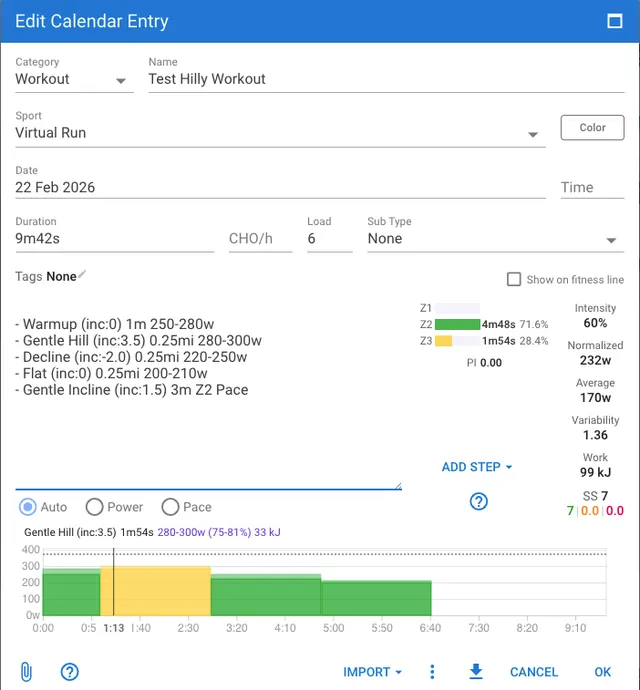
- Example step names: Warmup (inc:0), Gentle Hill (inc:3.5), Recovery (inc:1.0).
Step-by-step setup
-
Build your workout in Intervals.icu
Create a structured workout and define each interval as you normally would (duration, distance, pace, power, and so on).
-
Add incline markers to step names
For each step that should control incline, append the marker in the step name using the format (inc:##.#).
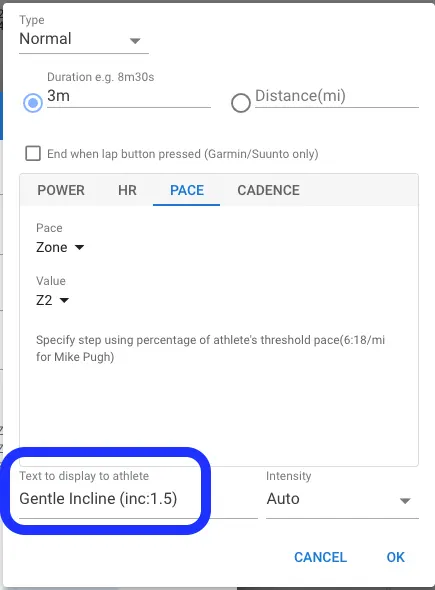
- Example: Gentle Incline (inc:1.5)
- Example: Decline Segment (inc:-2.0)
-
Export the workout as a .FIT file
Download/export the completed workout from your platform as a structured workout FIT file.
-
Import the FIT workout into PowerTread
Import the workout into PowerTread and start it as you would any other structured run.
-
Run and let incline change automatically by step
When each tagged step begins, PowerTread reads the incline marker and updates treadmill incline for that interval.
Intervals.icu example
These screenshots show where to place incline markers in step names and how the full workout can look before exporting.
Screenshots
Tips
- Keep marker formatting consistent: parentheses, lower-case inc, colon, numeric value.
- Use concise step names so the incline marker stays easy to read.
- Test one short workout first to confirm incline behavior with your treadmill model.
Important Limitation
Course Simulation mode is not available for incline-based workouts
When you run a structured workout that uses incline step markers like (inc:##.#), PowerTread applies treadmill incline from the workout steps and does not run Course Simulation mode at the same time.